Higgsfield Review: Soul 2.0 and Alternatives
Higgsfield Soul 2.0 is a good fit when you want a polished, fashion-style portrait from a preset or short text prompt. You can run it on SYNTX.AI alongside 100+ other AI tools for image, video, audio and text instead of getting a separate Higgsfield plan.
This review covers what Soul 2.0 adds, how presets and Create a character work, how to use Soul on SYNTX.AI and which alternatives fit other jobs.
Higgsfield Soul 2.0 at a glance
If you’re short on time, here are the key facts that matter most.
| Question | Answer |
|---|---|
| What is Higgsfield Soul? | An image model from Higgsfield AI for realistic, fashion-aware photos |
| When did Soul 2.0 launch? | February 19, 2026 |
| What modes does it have? | Text-to-image, reference mode and Soul ID for consistent characters |
| How many presets does Higgsfield Soul have? | 20+ at launch, and Higgsfield's guides now cite 50+ styles |
| How many photos does Create a character (Soul ID) need? | At least 20 and up to 80, with training time of about 3 minutes |
| Alternatives on SYNTX.AI | Nano Banana 2.1, Seedream 5 Pro, GPT Image 2.5, Ideogram 4.5, FLUX Kontext Multi and more |
What is Higgsfield Soul?
Higgsfield Soul is a family of image models from Higgsfield AI for realistic, fashion-aware photos. The family has three models, namely Soul for quick preset-driven images, Soul 2.0 for full creative control and Soul Cinema for cinematic-grade visuals.
Soul 2.0 launched on February 19, 2026. Higgsfield calls it a foundation image model for the creative, fashion-aware, culture-native generation.
Higgsfield started with video (it launched a browser-based AI video tool in March 2025), and Soul is its photo line.
What's new in Higgsfield Soul 2.0?
The biggest change in Soul 2.0 is control over the result, thanks to:
- Reference mode. Upload a reference photo and the result follows it. Once you attach one, the prompt field isn't available, so the photo does all the steering.
- Understanding of camera terminology. You can specify the camera brand, lens, focal length and other characteristics, and the model will recreate that physical setup.
- Moodboards. You steer the style with your own sample images instead of a ready-made preset.
- Soul HEX. You set a color palette with hexadecimal color codes. It works in Soul 2.0 and Soul Cinema.
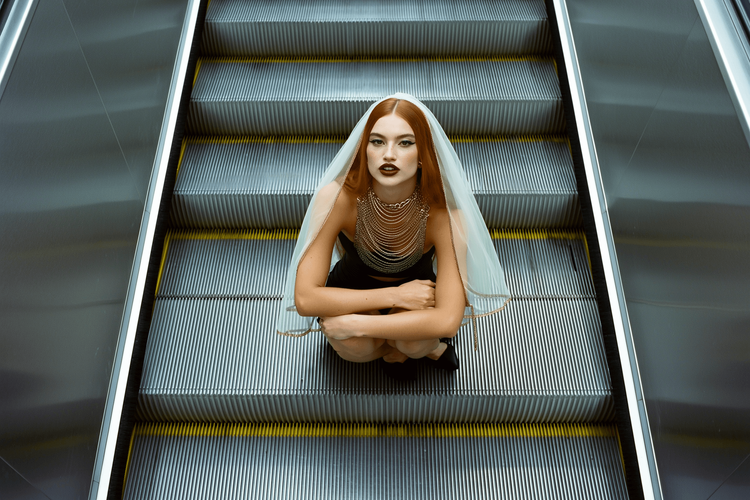
In our tests, Soul generated realistic poses and skin texture, and the prompt adherence was on point.
Higgsfield Soul presets
Higgsfield Soul presets are ready-made visual styles that set the overall look of an image. Soul 2.0 launched with 20+ curated presets, and Higgsfield's own guides now cite 50+ styles such as Amalfi Summer, Gorpcore Outdoor and 0.5 Selfie.
A preset decides the look and your prompt decides the content, so pick the preset first and then describe the subject, outfit and setting. If you combine a preset with a trained character, the preset drives the look and the character keeps the face.
Keep in mind that presets may overrule text prompts. For example, if you write “full-body shot” in the prompt but the preset is tailored for portraits, you’ll get a portrait.
Test the same prompt in two or three presets to see how much the look changes, and don't repeat in the prompt what the preset already sets.
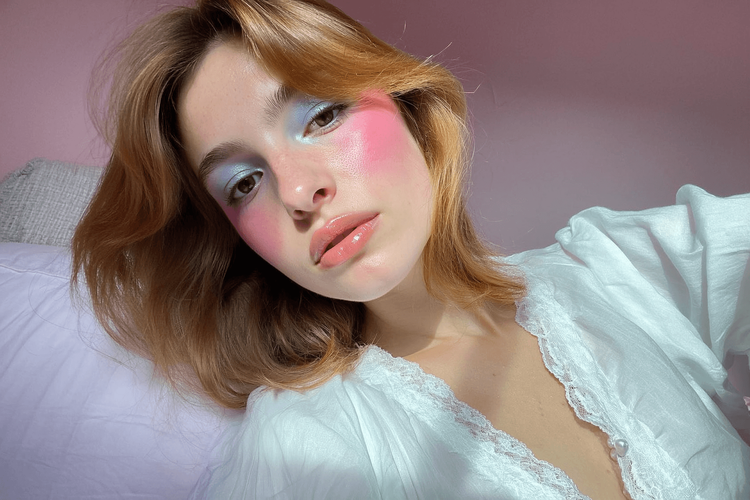
Soul ID: how to create a consistent character
Create a character trains a reusable character from your own photos, so the same face shows up in every image you generate. You upload at least 20 photos of one person, name the character and select it when you generate. Higgsfield calls this character Soul ID. It works across the whole Soul family (Soul, Soul 2.0 and Soul Cinema), and training takes a few minutes.
A few tips for achieving the best result:
- Use 20 or more photos of the same person, from different angles and with different expressions. Up to 80 are supported, but more photos don't automatically give better results.
- Choose high-quality, well-lit photos that show the face clearly.
- Avoid sunglasses, heavy shadows and cropped faces.
Only upload photos of yourself or of someone who gave you permission.
How to use Higgsfield Soul on SYNTX.AI
Higgsfield Soul runs inside SYNTX.AI next to the other image models, so you can generate and compare results without switching tools.
- Open SYNTX.AI and sign in to your account.
- Go to the Image tab and select Higgsfield Soul from the Model selection dropdown menu on the right.
- Set the aspect ratio and choose between Basic and High generation quality. Then, pick batch size (just one image or four images at once).
- Optional: Pick a preset for the overall look. You can adjust Style strength with a slider.
- Optional: Use Create a character if you want the same face across images. Add your photos, following the instructions above, and select the finished character.
- Write a prompt that describes the subject, outfit, setting, camera setup and light.
- Run the request. You can access your generations at any time from chat history.
How to write prompts for Higgsfield Soul
Higgsfield Soul 2.0 understands photography terms, so it’s best to be specific. Cover the following in your prompt:
- Subject: gender, age range, appearance, expression, pose
- Wardrobe: garment, material, fit, color, accessories
- Setting: location, time, weather, background elements
- Composition: close-up, medium shot, full-body, subject placement
- Camera: focal length, camera height, angle, depth of field
- Lighting: source, direction, softness, color temperature
- Look: editorial, documentary, cinematic, film stock, color palette
- Quality cues: natural skin texture, realistic fabric, subtle grain
Here's an example prompt and generation result.
Editorial fashion photograph of an adult woman with shoulder-length dark hair and natural makeup, wearing an oversized charcoal wool coat over a black silk blouse, standing in a relaxed pose on a rainy downtown street at dusk. Full-body composition, subject slightly off-center, wet pavement reflecting blurred storefront lights. Shot from a low camera angle with a 35mm lens, moderate depth of field. Soft cool window light from camera left, subtle warm streetlights in the background, muted blue-gray palette, realistic wool texture, visible natural skin texture, restrained film grain.
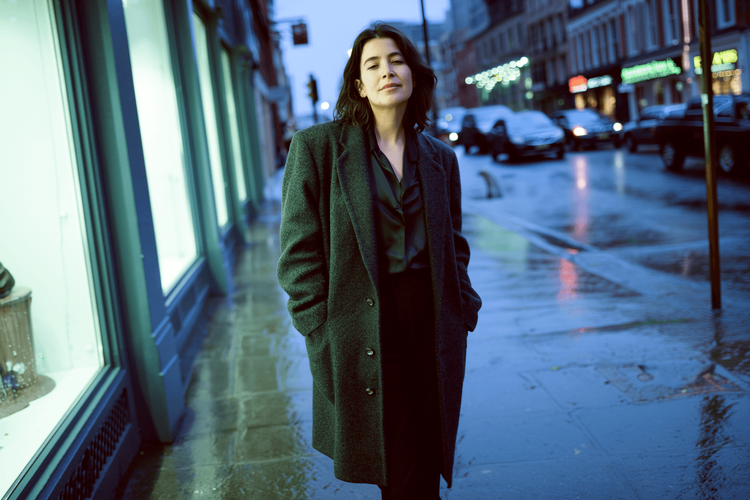
With a Soul ID, you don't need to repeat detailed facial features, since it already carries the identity across generations. Just describe the outfit, pose, setting, camera, and lighting, and only add a short identity note if a specific trait really needs to hold. For a multi-image series, Soul ID is the more reliable choice than reusing a single reference image.
A few more tips:
- Describe one scene per prompt instead of a list of ideas.
- Change one detail per attempt, then compare the results.
- For a series, keep the character description word for word across prompts.
- Keep the seed unchanged when testing prompts. A fixed seed helps reproduce a similar composition and gives more reliable comparisons, although changing the prompt or other settings can still alter the result. Use a new seed when you want more visual variation.
Higgsfield Soul pricing
Generations with Higgsfield Soul on SYNTX.AI are paid in tokens, and the cost depends on the output settings. Unused tokens never expire and carry over to the next month when you renew your SYNTX.AI plan.
| Generation quality | Batch size | Price, tokens |
|---|---|---|
| Basic | 1 | 4 |
| Basic | 4 | 16 |
| High | 1 | 9 |
| High | 4 | 36 |
Presets and style strength don’t affect the generation cost, and neither does aspect ratio.
Higgsfield AI alternatives
The best Higgsfield alternatives on SYNTX.AI are Nano Banana 2.1 for reference-based edits and consistent characters, Seedream 5 Pro for regional edits and GPT Image 2.5 or Ideogram 4.5 for readable text. All four are available under one subscription.
| Model | Best for | Key features | Compared with Soul |
|---|---|---|---|
| Nano Banana 2.1 | Edits and consistent characters | Plain-language edits without masks, up to 14 reference images | Changes one thing in an existing image where Soul generates a styled new one |
| Seedream 5 Pro | Regional edits and layered work | Select an area and describe the change, split an image into up to 16 layers | More hands-on control over parts of the image |
| GPT Image 2.5 | Posters, mockups and text in images | Flare for speed and Sunburst for tighter edit control, reference images | Better suited to readable text |
| Ideogram 4.5 | Typography and photo restoration | Keeps untouched pixels, edits and translates text, up to 4 references | A typography focus instead of a fashion focus |
| FLUX Kontext Multi | Instruction edits with several references | Reference strength setting | In our tests it struggled most with full-body anatomy |
Try Higgsfield Soul and its alternatives on SYNTX.AI
On SYNTX.AI, Higgsfield Soul and its alternatives run in the same interface, so a three-way test only takes a few clicks.
- Pick one scene and write a prompt.
- Run it in Higgsfield Soul, Nano Banana 2.1 and Seedream 5.5.
- Compare skin, pose, light and detail, then keep the model that fits your job.
Apart from image models, you get access to 100+ leading tools for video, audio and text, including ElevenLabs, Seedance, ChatGPT and Claude.
FAQ
Is Higgsfield Soul 2.0 free?
Generations with Higgsfield Soul on SYNTX.AI are paid in tokens, and the price depends on selected settings. Unused tokens don’t expire but carry over to the next month.
Is there any AI better than Higgsfield?
Yes, for specific tasks. Nano Banana 2.1 is better suited for edits from references, Seedream 5 Pro for regional edits and GPT Image 2.5 or Ideogram 4.5 render more readable text. Higgsfield Soul stays the pick for styled fashion photos from presets.
What's a good Higgsfield AI alternative?
Start with Nano Banana 2.1, which accepts up to 14 reference images and edits from plain-language instructions. Move to GPT Image 2.5 or Ideogram 4.5 for readable text, or to Seedream 5 Pro for image editing. All of them run on SYNTX.AI next to Higgsfield Soul.
What is Higgsfield Soul ID?
Soul ID is Higgsfield's character consistency system. You create it with the Create a character feature by training on at least 20 of your own photos, then reuse the character in new scenes.