

Seedream 5.5 Review: What’s New in ByteDance’s Latest Image Model
ByteDance has shipped Seedream 5.5. The biggest improvements are text legibility and transparent backgrounds, which we already verified with hands-on testing. Without further ado, let’s see what else the new model has to offer and how it differs from earlier versions.
Seedream 5.5 features
Seedream 5.5 is ByteDance’s flagship image generator. It reads text and image input, generates, edits, and keeps a subject recognisable across a batch.
| Feature | Description |
|---|---|
| Region-precise editing | You select an area, describe the change, and everything outside the selection stays as it was |
| Layer separation | Output splits into subject, background and text layers you can move and edit separately |
| Reference images | Upload several sources and carry a character or product across a batch |
| Dense text | Small type, mixed fonts and long strings render reliably |
| 4K output | Native high resolution, no upscale pass |
| Sketch completion | A rough drawing comes back as a finished frame |
| Web grounding | Recent visual references, pulled at generation time |
Seedream 5 vs 5.5
Seedream 5.5 runs on the same underlying model as Seedream 5, so simple prompts get you a similar result on both. But when it comes to editing, working with layers or text rendering, the new version excels.
| Feature | Seedream 5 | Seedream 5.5 |
|---|---|---|
| Region-precise editing | Yes, with looser edges | Edits stop at the edge of the selection |
| Layer separation | Partial | Full subject, background and text layers |
| Dense text rendering | Improved over 4.5 | Handles small sizes and mixed fonts |
| Reference images | Yes | Yes, with more consistent subjects across a batch |
| Generation speed | Baseline | Faster |
| Pricing | Lower | Higher |
For single images with short headlines, Seedream 5 still works and costs less. Spending extra tokens on 5.5 makes sense when one campaign asset goes through repeated edits, or when a layout has to be taken apart and rebuilt.
Seedream 4.5 vs 5.5
Seedream 4.5 shipped in December 2025 with 4K output, native image-to-image editing, and up to 14 reference images per request.
Seedream 5 added three things 4.5 couldn't do. You could draw a selection and confine the edit to that area. Output could come back as separate subject, background and text layers. And the model could pull current visual references from the web while generating.
The latest version offers the same functionality with better prompt adherence and generation accuracy.
Testing results: prompts and images
We ran the same prompts through Seedream 4.5. and 5.5, and the difference was drastic. Judge for yourself.
Product photo for a catalogue: a teddy bear in baked-milk beige with long fluffy fur, a red silk bow at its neck, bead eyes. Sitting upright, looking at the camera. Soft window light from the left. Eye-level angle, the whole object in frame, individual fibres visible along the edge of the silhouette. Fully transparent background, PNG with alpha channel, the object separated from the background with a clean edge.
First, we tested how the model handles transparent backgrounds. Seedream 5.5 closely followed the prompt and created a product image we wouldn't be ashamed of using on an actual e-commerce website.

Now, Seedream 4.5. Well, ByteDance never claimed it's suited for images with transparent backgrounds, but at least this test shows where 5.5 really excels. And what happened to the teddy's fur?

Next, we checked how the model handles posters with text.
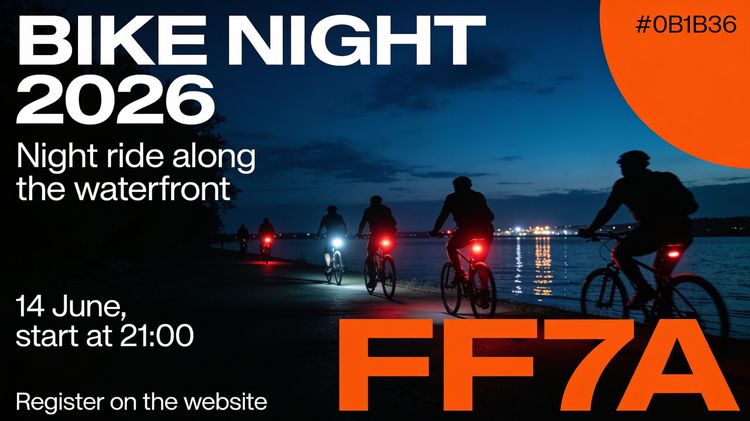
City event poster, vertical. Scene: a night waterfront, silhouettes of cyclists with red and white lights, dark blue sky, the lights reflected in the water. Composition: headline large at the top, subheading beneath it, date and time bottom left, registration line at the very bottom. Text in English, verbatim: headline "BIKE NIGHT 2026", subheading "Night ride along the waterfront", date "14 June, start at 21:00", bottom line "Register on the website". Typeface: headline in bold white sans-serif, the remaining lines in light white sans-serif. Colours: background #0B1B3A, orange accent #FF7A1A. Constraints: no extra text, logos or watermarks in the frame.
Seedream 5.5 placed the text exactly where we asked it to. No typos are present, and the background looks very realistic. If we didn't know it's AI-generated, we wouldn't be able to tell. The model might not fully replace a graphic designer, but for simple posters like this, it does the job. One tiny slip is an extra space in the "start at 21:00" text.

Text legibility and accuracy wasn't an issue with Seedream 4.5 either. However, the model treated color codes as text that should appear on the image and made it gigantic.
Seedream vs Nano Banana
We get asked this more than anything else.
Nano Banana is the stronger conversational editor. It holds context across several turns and remembers what you asked two steps back, which makes it better for working through a series of images.
Seedream handles layouts with text better. Its strengths are dense text, small type, layered output and 4K resolution. If you need a poster with a headline, a body block and a footer, pick Seedream. If you need an image refined across a back-and-forth, pick Nano Banana.
The task decides it. Neither model wins outright.
Seedream 5.5 pricing
On SYNTX.AI, each generation costs tokens. What a render costs depends on the model version, resolution and mode. Unused tokens don’t expire but carry over to the next month. One subscription lets you use Seedream along with 100+ other models for text, image, video and audio generation.
Here's a rough breakdown of what it costs to generate an image in Seedream on SYNTX.AI.
| Model version | Resolution | Cost in tokens |
|---|---|---|
| Seedream 5.5 | 1K | 3 |
| Seedream 5.5 | 2K | 6 |
| Seedream 4.5 | 2K | 2 |
How to use Seedream 5.5 on SYNTX.AI
Both versions are live, and no ByteDance account is needed.
- Sign up at SYNTX.AI with an email address. New accounts get welcome tokens, which you can use to try some of the AI models for free.
- Go to the Image tab.
- In the dropdown menu on the right, select Seedream, then choose 5.5 or another version.
- Pick an aspect ratio, resolution and mode.
- Paste your prompt and generate. Attach reference images if needed.
You can access your generation history anytime from your account dashboard.
Our first impressions
Our team spent a few hours creating posters, product shots, portrait edits and images with text-heavy layouts in Seedream 5.5. Our key findings:
- Typography is the main reason to pick this version over earlier ones. Headlines, mid-size lines and small footer type all came back spelled correctly and placed where the prompt asked, including mixed fonts on the same poster.
- Text placement varies between renders until you specify it. State placement, size and alignment for each text block before you generate if you have a specific idea in mind.
- Transparent backgrounds make it ideal for product shots. The subject comes back separated from the background with a clean edge, no manual cutout afterwards. This step that used to eat the most time in a catalogue workflow. In our tests, the model didn't fail even at fine detail like fur, hair and thin straps before compositing.
- Pointed edits hold the subject in place. We ran about ten rounds of edits on the same portrait, changing nail color and clothing each time, and the face, lighting and pose stayed consistent across all of them. The background didn't. It drifted a little further from the original with every round, so by the last pass the room behind the subject no longer matched where it started. It helps to define what has to stay fixed, not only what has to change, in your prompt.
Tip: draft on Seedream 4.5, then rerun the prompts that worked on 5.5 at high resolution to save tokens.
Try Seedream 5.5 now
The new version is already live on SYNTX.AI, so you can test it first-hand and decide if it’s right for your task. If it’s not, you get to use Nano Banana, Ideogram, GPT Image and 100+ other AI tools in one interface. Switch and compare tools in a few clicks, right from your browser, and save on individual subscriptions with all-in-one plans that fit your workflow.
FAQ
What is the difference between Seedream 5 and Seedream 5.5?
5.5 adds full layer separation, edits that stop at the selection edge, and reliable small-type rendering. Seedream 5 handles single images at a lower cost. Stay on 5 while your assets are simple, and move up when a layout needs taking apart.
Is Seedream 5.5 better than Nano Banana?
The choice between Seedream and Nano Banana depends on the job. Seedream does better with dense text, print layouts and resolution. Nano Banana does better with multi-turn editing and session memory.
How much does Seedream cost?
ByteDance bills per image by resolution and quality tier. SYNTX.AI subscription gives you a set number of tokens per month, depending on the plan, and every generation’s cost depends on the model, resolution and mode you select. Tokens never expire, so what you don’t use this month carries over to the next.
Does Seedream 5.5 still get text wrong?
Rarely on headlines and short lines, which is the main improvement in this release. Dense paragraphs at small sizes are worth reading closely before publishing. We recommend putting the copy in quotes in your prompt for accuracy.